Free · Nothing uploaded · No account
Find the photo you can describe but can’t name.
Your files are called IMG_2041.jpg and scan0007.pdf. You remember them as “the dog on the beach” and “that café receipt”. Rummage searches a folder of your own photos and documents by what they show and say, and it does it all in your browser, on your own computer.
Works in Chrome and Edge on a computer. The first visit downloads the AI model, about 284 MB, once.
-
a dog at the beach
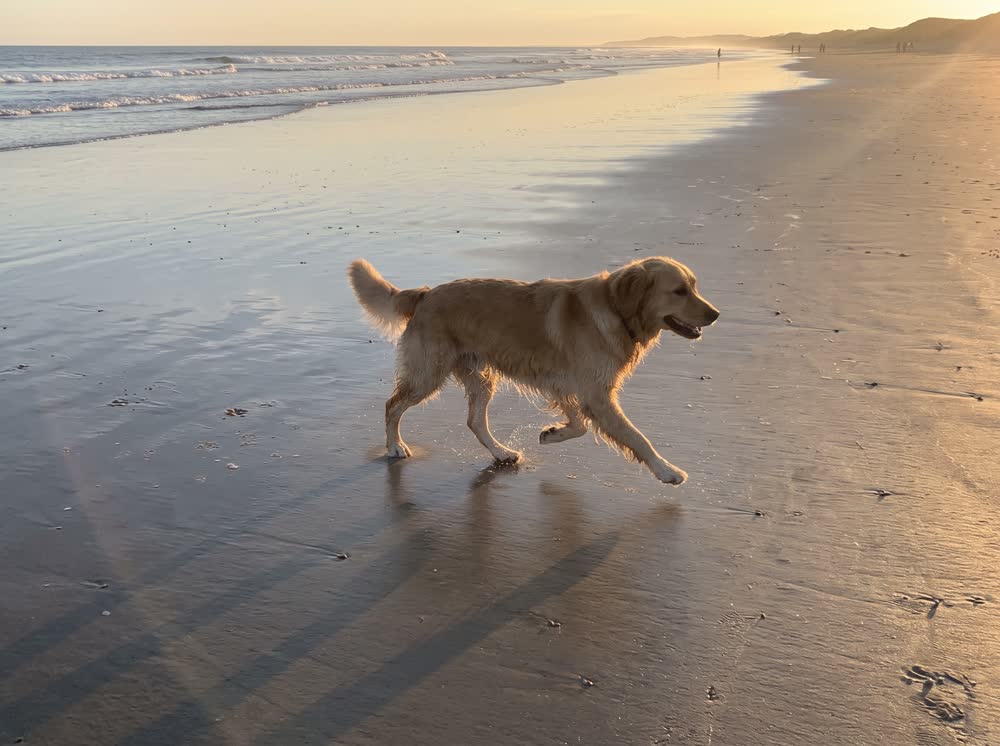
IMG_2041.jpg Found by what the picture shows. Its name says nothing.
-
how much was the coffee?

scan0007.jpg Found by the words in the picture. It reads receipts, whiteboards and handwriting.
-
when is the rent due?
Flat 4B.txt Papers
Flat 4B, 18 Marlow Street: summary of the tenancy… The rent is 1,450 a month, due on the first day of each month by bank transfer.
Found by what the document says, at the passage that answers.
These are real searches of the sample folder, which you can try yourself. Its pictures were made with AI for the purpose.
How it works
Three steps, and the second one happens by itself.
-
1 · Choose
Pick a folder
A folder of photos, a drive of old scans, a project’s documents. Your browser asks your permission, and Rummage sees that folder and nothing else.
-
2 · Read
Rummage reads it
An AI model in the page looks at each picture and reads each document, several a second with a recent graphics card. It happens once; later visits read only what is new.
-
3 · Find
Describe what you want
Type it the way you’d say it to a friend. Answers come back as you type, and “More like this” finds the pictures that resemble one you picked.
What it finds
It searches by meaning, so you don’t need the right word.
Pictures, by what they show
“A red bicycle”, “birthday candles”, “a mountain lake”. JPEG, PNG, WebP, GIF, BMP and AVIF, wherever they sit in the folder.
Words inside pictures
Screenshots, receipts, a photographed whiteboard, a shopping list on the fridge. Search for what is written on them.
Documents, by what they say
Ask a question and get the passage that answers it, with the page it is on. PDF, text, Markdown, saved web pages, CSV, JSON and subtitles.
Scans with no text in them
A scanned letter is a picture of a page. Rummage looks at the first 12 pages of a scanned PDF, so it can be found by what it says all the same.
Not yet: Word and Excel files, video, sound, and iPhone HEIC photos (Chrome can’t open those). One folder can hold up to 60,000 pictures and documents.
Private by design
Search tools usually want your files on their computers. This one leaves them on yours.
Nothing is uploaded
The model runs in the browser tab. Your pictures, your documents, their names and your searches stay on your computer. There is no account to make.
The index lives with your files
What Rummage learns is kept in a small .rummage folder inside the one you chose. Move the folder and the index moves with it. Delete it and Rummage has forgotten everything.
Your files are never changed
Rummage reads. The only thing it writes is its own index. Nothing is renamed, moved, tagged or deleted.
What does leave your computer: the page asks Hugging Face, a public library of AI models, for the model the first time. And if the model fails to start or stops working, the page sends us the error message and your browser’s name, so we can fix it. Never anything about your files.
Why it’s free
Your computer does the work, so there is nothing to bill.
Services that search your photos run large computers and pass the cost on, in money or in what they learn from your files. Rummage’s model is small enough to run on a laptop, so a search costs us nothing. If it saves you an afternoon of scrolling, you can buy me a coffee.
- SearchesAs many as you like
- FoldersAs many as you like
- AccountNone
- PriceFree
Questions
Before you point it at your files
Do my files get uploaded?
No. Rummage reads your pictures and documents inside your browser, on your own computer. No server does the work, so your files, their names and what you search for never reach us. The first time, the page downloads the AI model (about 284 MB) from Hugging Face, a public library of AI models, and your browser keeps it. If the model fails to start or stops working, the page sends us a short anonymous note: the error message, your browser’s name and whether it was using the graphics card. That is all we receive.
Is it free?
Yes. Your computer does the work, so a search costs us nothing and we don’t charge for it. There is no account and no limit on how much you search.
Which browsers does it work in?
Chrome or Edge on a computer: Windows, Mac, Linux or a Chromebook. Those are the browsers that let a page open a folder you choose. A graphics card from the last several years makes reading fast; without one Rummage still works, more slowly. Other browsers and phones can’t open a folder of yours yet.
What kinds of files can it search?
Pictures (JPEG, PNG, WebP, GIF, BMP and AVIF) by what they show, including words in them, such as a receipt, a whiteboard or a handwritten note. Documents by what they say: PDF, plain text, Markdown, saved web pages, CSV, JSON and subtitle files. A scanned PDF with no text in it is looked at as pictures, its first 12 pages. Word and Excel files, video, sound and iPhone HEIC photos aren’t read yet.
How long does it take to read a folder?
On a computer with a recent graphics card, several pictures a second, so a few thousand photos take some minutes. It happens once: Rummage remembers what it has read, and next time it looks only at what is new or changed. You can search what has been read so far while it carries on. One folder can hold up to 60,000 pictures and documents.
Where is the index kept, and how do I delete it?
In a folder named .rummage inside the folder you chose. It lists your files’ names, holds a row of numbers describing each picture and passage, and keeps the first lines of each passage so results can show them. It holds no copies of your pictures. Delete that folder, or choose “Forget this folder” in Rummage, and it is gone. Your own files are never changed.